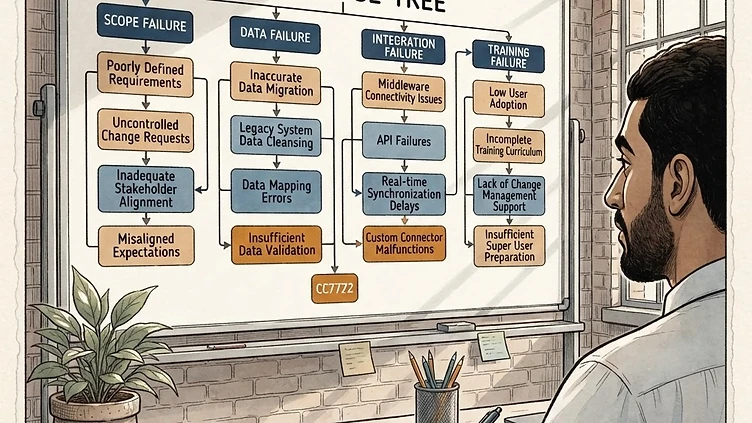
Dayforce implementations fail at a higher rate than most buyers expect — and the failure modes are predictable. Poor data migration from legacy systems is the most common root cause, but it rarely acts alone. Across mid-market implementations, the same five failure modes appear in different combinations, and they compound: a missed data audit creates load failures that compress UAT, which pushes integration testing into the go-live window, which produces the first production payroll on unvalidated data. Recognizing these patterns before project kickoff is the highest-leverage action a mid-market company can take. This guide covers each one, with real scenarios and specific mitigations for each failure mode.
Why Dayforce implementation failure happens more than the demos suggest
Dayforce is a deep platform. The organizational structure, earning codes, pay groups, work rules, benefits configuration, and integration layer interact in ways that require hands-on Dayforce expertise to navigate correctly. Implementation partners vary significantly in quality — and mid-market companies are often under-resourced for the internal project management that a Dayforce implementation demands alongside their normal operations.
The result is a gap between what the demo shows and what the implementation requires. The demo shows a working Dayforce environment configured for a generic company. The implementation requires configuring Dayforce for your specific company — your legal entities, your pay group architecture, your earning codes, your benefit carrier feeds, your time hardware, your GL mapping. Each of those decisions is a potential failure point if it is made without Dayforce-specific expertise.
Failure mode 1: Poor data migration from legacy systems
Data migration from ADP, UKG, or another legacy HRIS into Dayforce is consistently the highest-risk phase of a Dayforce implementation — and the one most often underestimated at contract. The migration requires extracting employee data from the legacy system, cleansing and transforming it to match Dayforce's data model, loading it into the Dayforce staging environment, and validating the output before go-live. Every step in that chain has failure points.
The specific failure points we see most often: incomplete historical records from the legacy system (employees whose records exist in summary form but not in detail, with compensation history or benefits elections that were not carried forward); field mapping errors where the decisions made in the mapping process become permanent data quality problems; and load validation failures where records rejected by Dayforce's staging environment are not corrected before go-live, creating gaps in the employee database.
The real scenario that illustrates why this matters: a 900-person manufacturer migrating from ADP discovers mid-load that 15% of employee records have missing year-to-date payroll balances. The migration team assumed the legacy ADP export would include YTD data in the expected format — it did not. Correcting the records requires going back to the legacy system, pulling supplemental exports, and re-mapping fields that were not included in the original data mapping document. The delay pushes parallel payroll back by three weeks, which compresses UAT, which produces a go-live on partially validated data.
Mitigation: full data audit in the discovery phase before configuration begins, a minimum of two parallel payroll cycles in the Dayforce staging environment, and employee-level reconciliation against the legacy system — not just totals.
Failure mode 2: Integration scope underestimated at contract
Companies sign a Statement of Work scoped to their known integrations and discover during the build phase that they have twice as many. GL integration, benefits carrier EDI feeds, scheduling tools, time and attendance hardware, third-party payroll interfaces set up informally years ago — each one is a separate build-test-fix cycle that was not scoped in the original contract.
The real scenario: a 1,400-person logistics company signs an implementation contract scoped for four integrations. In week three of the build phase, the integration discovery audit — which should have happened in week one of discovery — surfaces three undocumented benefits carrier feeds and two legacy scheduling integrations that were never migrated off the old system. The contract has no change order process for integration scope additions. The implementation partner absorbs the work or the company pays out-of-scope charges. Either way, the timeline slips by six weeks.
Mitigation: mandatory integration inventory audit in the first week of discovery, before the Statement of Work is finalized. The inventory should include every system that currently sends or receives employee data — even informally, even through manual exports. Third-party carrier coordination should have explicit buffer in the implementation schedule, because carrier timelines are outside the implementation team's control.
Failure mode 3: Configuration decisions made without Dayforce expertise
Pay group architecture, earning code setup, work rules, and organizational structure all require Dayforce-specific knowledge to configure correctly. Companies that rely on Ceridian-trained generalists, or that make configuration decisions without a specialist who has done the same setup in Dayforce before, often build a system that calculates wrong silently.
Need hands-on help with Dayforce?
Talk to our team →The real scenario: a 600-person company sets up earning codes for bonuses and overtime without understanding how Dayforce handles supplemental wage withholding interactions at the pay group level. The configuration looks correct in the Dayforce UI. Payroll runs without errors. The first bonus cycle runs six months post-go-live, and the supplemental withholding applies at the wrong rate across the entire bonus pool. The error traces back to an earning code configuration decision made in week four of the implementation by someone who had configured ADP but had not configured Dayforce.
The configuration error you won't find until it's too late
Dayforce does not throw errors for most misconfigured earning codes or pay group rules. Payroll runs clean. The first signal is a W-2 mismatch, a quarterly reconciliation variance, or a bonus cycle that withholds at the wrong rate. By the time the error surfaces, it has run through multiple payroll cycles and affected real employee pay. Build configuration validation checkpoints into the implementation schedule — specifically for earning codes, pay group rules, and tax authority assignments — before go-live, not after.
Failure mode 4: Change management treated as an afterthought
The most common thread across failed mid-market Dayforce implementations is change management underinvestment. Companies treat Dayforce implementation as a technical project and employee adoption as a secondary concern that will resolve itself once the system is live. It does not resolve itself.
Change management underinvestment produces a specific, attributable pattern of post-launch damage: managers who revert to offline processes because the system is unfamiliar, HR staff who spend the first 30 days processing exceptions instead of doing strategic work, and an employee support ticket volume that overwhelms the payroll team in the first month of production.
The real scenario: a 750-person retail company goes live with Dayforce on a Monday after a three-day manager training session run the week before go-live. By Wednesday, 40% of store managers have reverted to paper timesheets because the Dayforce mobile interface is unfamiliar and managers do not know how to approve exceptions. The payroll team spends the first two weeks manually entering hours from paper timesheets alongside running the live Dayforce environment. The manual workarounds persist for three months.
Mitigation: change management as a concurrent workstream with the technical build, not a post-go-live activity. Identify the managers and HR staff most affected by the new system early. Involve them in configuration decisions. Run training in the staging environment, not in slide decks. Parallel payroll gives users time to get comfortable before the system goes live for real.
Failure mode 5: UAT compressed to protect a pre-set go-live date
The most preventable failure mode in a Dayforce implementation. Companies that set a go-live date in the Statement of Work and then compress UAT to hit that date are the ones who go live with unvalidated integrations and unresolved data quality issues — because the schedule leaves no room to discover and fix problems before the cutover.
The real scenario: a 1,100-person financial services firm sets a Q1 go-live date to align with the fiscal year. Three weeks before go-live, parallel payroll validation surfaces garnishment configuration errors affecting 87 employees. Fixing the errors requires reconfiguring garnishment rules, re-running parallel payroll, and re-validating the affected population. The project sponsor, unwilling to move the go-live date, directs the team to fix the errors during UAT and proceed with cutover. The fix is applied but not fully validated. Go-live proceeds. The garnishment errors resurface in the first production payroll, affecting the same 87 employees — plus 12 additional employees whose garnishment configuration was disrupted by the emergency fix.
Mitigation: go-live date contingent on UAT exit criteria, not the other way around. Define the exit criteria in the SOW: zero critical defects, zero high-severity defects, all parallel payroll variances resolved, all integrations passing end-to-end. If the exit criteria are not met, the go-live date moves — not the criteria.
What mid-market companies should take from this
The five failure modes above are not independent. They compound. A data migration problem that compresses UAT produces a go-live on unvalidated data, which produces configuration errors that surface in production, which produces the manual workarounds that change management was supposed to prevent. The highest-leverage action a mid-market company can take before a Dayforce implementation is recognizing these patterns and building the prevention steps into the project plan from day one — not as contingencies, but as non-negotiable project requirements.
Struggling with Dayforce Consulting?
Harmon & Co specializes in Dayforce consulting for mid-market companies. We fix it the first time — no endless ticket queue, no generic advice.