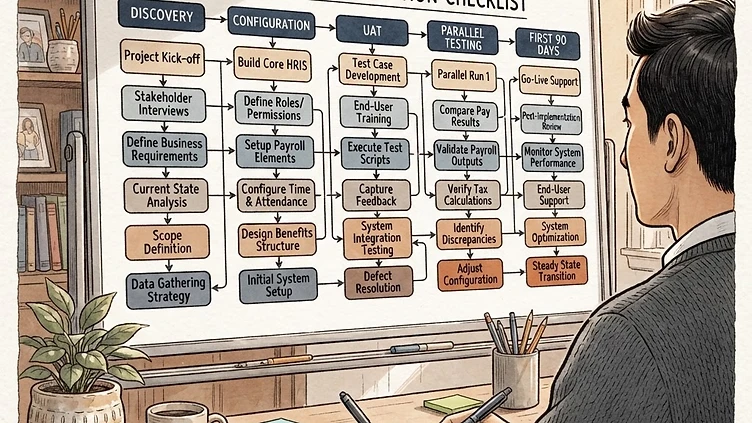
Most Dayforce implementations that struggle don't fail because the software is too complex — they fail because the ownership model is unclear, the testing is rushed, and nobody told the HR team what they were actually responsible for. A solid Dayforce implementation checklist isn't a generic project plan. It's a document of specific decisions, validations, and handoffs that your team needs to own, in the order they need to happen, with enough specificity that "done" is unambiguous. This guide covers all five phases, with particular focus on the gaps that Ceridian and implementation partners typically leave to the client to figure out.
The five phases of a Dayforce implementation
Every Dayforce implementation moves through the same five phases, even if the timeline and depth vary by company size and scope. Understanding what happens in each phase — and what decisions are made — is the prerequisite to knowing where things can go wrong.
Phase 1: Discovery
Discovery is where the project scope is locked, the current-state data is catalogued, and the configuration decisions that will govern the entire build are made. In practice, this is often the most under-resourced phase — implementation partners want to move to the build quickly, and HR teams don't yet realize how many design decisions are being made implicitly rather than explicitly.
Critical discovery deliverables your team should own:
- Pay group matrix: Every distinct combination of pay frequency, FLSA status, processing location, and payroll jurisdiction is a separate pay group. Document all combinations before the build starts.
- Org hierarchy design: How many levels, what do they map to in your current org, and where does each existing department/location slot in? This decision affects reporting for years.
- Data inventory: Every field you expect to see in Dayforce on day one needs a source. Historical data, current job assignments, benefit elections, deduction balances — map each to where it's coming from and who owns the extraction.
- Integration list: Every system Dayforce needs to talk to, in both directions, with a designated integration owner from your side.
Phase 2: Design
Design is where the discovery decisions get translated into Dayforce configuration specifications. Work rules, earnings codes, pay policies, role-based security groups, workflow routing — these are designed in this phase, not the build. If you skip the design step and go straight to building, you will rebuild.
The most consequential design decisions made in Phase 2 are pay group structure, position management approach (position control on or off), security role matrix, and workflow approval chains. Get all of them documented and signed off before a single field is configured in the tenant.
Phase 3: Build
Build is the longest phase: system configuration, data migration, integration development, and report building all run in parallel. Your team's job during build is not passive — you need to be reviewing configuration decisions as they're made, not waiting for UAT to discover them.
Specifically: attend configuration walkthrough sessions with your implementation partner, not just the completion demos. The walkthrough is where you see how something was built; the demo is where you see that it was built. If you only attend demos, you're approving outputs without understanding what drives them.
Phase 4: Testing
Testing in Dayforce implementations consists of three sequential phases: unit testing (does each configured element work in isolation?), integration testing (do the connected systems exchange data correctly?), and parallel payroll testing (does Dayforce produce the same payroll results as the legacy system?). Parallel testing is the highest-stakes phase and the one most often compressed when timelines slip.
Phase 5: Go-Live
Go-live is not the end of the project — it's the beginning of the stabilization period. The first 30 days post-launch are when configuration gaps and edge cases surface in real payroll data. Plan for it.
What HR teams own vs. what the implementation partner owns
Implementation partners build and configure the system. HR teams own the decisions that drive what gets built. The distinction matters because when there's a gap — a configuration that wasn't discussed, a workflow that wasn't designed — the question of who's responsible determines whether it gets fixed under the existing contract or becomes a change order.
HR teams are typically responsible for:
- Defining the pay group structure (the implementation partner configures it, but the design decisions are yours)
- Providing source data for migration in the agreed format, on the agreed timeline
- Writing and executing parallel payroll test scripts — testing your own payroll results against legacy system output
- Reviewing and approving role-based security configurations before go-live
- Training end users — supervisors, managers, employees who will use self-service
- Establishing the ongoing configuration governance process for post-go-live changes
Implementation partners are typically responsible for:
- Tenant configuration based on approved design specifications
- Technical integration development
- Standard report development per the agreed report library
- Migration scripting (but not the source data itself)
The most common gap: data validation. Both sides assume the other is validating that migrated data is correct. Often, neither is doing it rigorously. See the next section.
Implementation partners deliver a working system. They don't guarantee that your historical data was clean, that your pay group design was optimal, or that your managers know how to approve timesheets. Those gaps land in HR's lap on day one of go-live. The teams that handle this well build a post-launch support plan before they go live — not after they discover the gaps.
Critical data validation steps before parallel payroll testing
Need hands-on help with Complete Implementation Checklist Mid Market?
Talk to our team →Parallel payroll testing is not a data validation activity — it's a calculation verification activity. By the time you run parallel payroll, your employee data, earnings code balances, and pay rate history need to already be correct. If you start parallel testing with dirty data, you'll spend the entire parallel period chasing data issues instead of configuration issues, and you'll have no confidence in whether the results match because of correct configuration or coincidentally offsetting errors.
Run these validations before parallel testing begins:
- Employee record completeness: Every active employee has a hire date, pay rate, pay group assignment, tax withholding setup, and direct deposit information. Pull a completeness report in Dayforce and verify counts match your HRIS source.
- YTD balance verification: If you're going live mid-year, every employee's year-to-date earnings, deductions, and tax balances need to be loaded and reconciled to the legacy system. This is typically the most labor-intensive validation step. Run a side-by-side report: Dayforce YTD vs. legacy payroll YTD for every employee, every balance bucket.
- Pay rate history: Employees who received rate changes during the year need those changes in Dayforce with the correct effective dates. A missing rate change means the retro calculation in parallel testing will show a false discrepancy.
- Deduction code mapping: Every deduction running in the legacy system has a corresponding earnings or deduction code in Dayforce, with the same tax method assignment. A deduction mapped to the wrong tax method (pre-tax vs. post-tax) will produce correct-looking paychecks that are calculating taxes incorrectly.
- Direct deposit accounts: Verify count of employees with direct deposit setup in Dayforce matches the legacy system. Missing direct deposit accounts mean live checks on day one — a payroll operations problem, not a configuration problem, but one that creates real employee relations issues.
Go-live readiness checklist: 8 specific items
These are the items that need to be verified in the week before go-live. Each one is a specific check, not a category.
- Parallel payroll sign-off is documented. You have a signed parallel payroll results document that shows net pay variance between Dayforce and legacy is within tolerance (typically less than $1 per employee) for two full pay periods.
- Tax agency configurations are active. Every tax jurisdiction where you have employees has a corresponding tax agency record in Dayforce with the correct EIN, filing frequency, and deposit schedule. Run a tax agency report and verify against your payroll tax registration documents.
- Direct deposit prenote cycle is complete. If you have employees using direct deposit for the first time through Dayforce, prenote verification (the test deposit cycle that confirms account numbers are valid) needs to complete before the first live payroll. This takes at least one business banking day — don't discover it's missing the night before go-live.
- Role-based security has been user-acceptance tested. A supervisor has logged in and confirmed they can see their own team and cannot see other teams. An HR manager has confirmed they can access the fields they need and are blocked from fields they shouldn't see. Do not assume the security configuration is correct without a live test by a real user.
- Workflows have been tested end-to-end. The most business-critical workflows — time-off request approval, new hire onboarding, pay rate change approval — have been submitted and approved by real users in a test environment. Workflow configuration errors are invisible until someone actually triggers the workflow.
- Integration files have been validated in production. If Dayforce feeds a downstream system (benefits carrier, 401k provider, general ledger), a test file has been transmitted and validated against the downstream system's expected format in the production environment — not just in staging. Environment differences in SFTP credentials, file naming, and transmission protocols cause integration failures that testing in staging won't catch.
- Help desk escalation path is defined. Your employees and managers know who to call when something doesn't work. Your HR team knows who at your implementation partner to contact for go-live week support, and that person's availability has been confirmed.
- Rollback plan is documented. If the first live payroll run produces incorrect results, what happens? Who has the authority to revert to the legacy system, what's the timeline for making that call, and what does it take to run the legacy payroll as a backup? You will almost certainly not need this plan. Document it anyway.
Post go-live: the first 90 days and what to prioritize
Days 1–30 are stabilization. Real payroll data surfaces configuration gaps that testing didn't catch — edge cases in pay rules, employees whose situations weren't covered in test scripts, deduction calculations that don't match what the carrier expects. This is normal. Have a designated configuration owner who can make corrections quickly.
Days 31–60 are the first normal operating cycle. By the second full pay period, the acute issues should be resolved. Focus shifts to report adoption: are managers and HR actually using the reports that were configured, or are they still running reports in legacy because the Dayforce reports don't have the right data? Close those gaps now, not six months from now.
Days 61–90 are process stabilization. Self-service adoption is measurable by now. If employees aren't using it, find out why. If managers aren't approving timesheets or time-off requests in the system, that's a training and change management problem that compounds over time. Address it in month three, not at the first year-end.
When to bring in an independent consultant
There are three common scenarios where an independent Dayforce consultant adds the most value:
Mid-implementation, when you've lost confidence. If you're in the build or test phase and your gut says the configuration is wrong, the data isn't matching, or your implementation partner isn't answering questions with specificity — bring in an independent review. A 20-hour configuration audit in month four costs a fraction of a failed go-live and two months of remediation.
Post go-live, within the first six months. If the first 90 days revealed more gaps than your team can address alongside normal operations, a scoped remediation engagement gets you to a stable baseline without requiring you to rebuild the implementation from scratch.
Before a major change. If you're adding a module, going through an acquisition that will add employees to Dayforce, or about to handle your first year-end in Dayforce, bringing in an expert for a scoped configuration review before the event is far less expensive than dealing with the consequences after.
When evaluating an independent consultant, ask specifically: how many Dayforce implementations have you led (not supported) for companies in my size range? Can you provide references from clients who went live in the last 18 months? What does your configuration review process look like — what do you actually examine and what do you deliver? If the answers are vague, keep looking.
If you're approaching go-live and want an independent set of eyes on your readiness, or if you're post-launch and dealing with gaps that the implementation partner says are "out of scope," reach out to us. We've led and reviewed Dayforce implementations for mid-market companies across manufacturing, professional services, healthcare, and distribution, and we're direct about what we find.
Need help with your Dayforce implementation?
We provide independent implementation reviews, go-live readiness audits, and post-launch remediation for mid-market Dayforce customers. Fixed scope, direct communication, no surprises.
Book a Free Consultation → See Our Services →Struggling with Dayforce Implementation?
Harmon & Co specializes in Dayforce consulting for mid-market companies. We fix it the first time — no endless ticket queue, no generic advice.