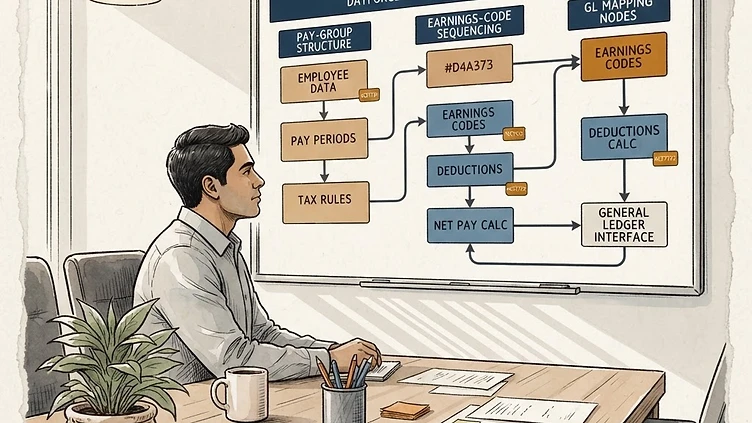
Payroll configuration decisions made during a Dayforce implementation are among the most durable — and most costly to undo — in the entire system. The choices made about pay group structure, earnings code sequencing, tax method assignments, and GL mapping don't just affect the first payroll run. They shape how payroll operates for years, and when they're wrong, the problems compound quietly until year-end forces them into the open. This guide covers Dayforce payroll configuration at the level of specificity that prevents those problems: the decisions that matter, the field names that carry the most weight, and the shortcuts that look harmless in month two but create real damage by Q4.
Pay group setup: the decisions that cause problems
A pay group in Dayforce is the processing unit for payroll — it defines which employees are paid together, how often, and through what processing schedule. Every employee belongs to exactly one pay group per employment record. Pay group design is one of the first major configuration decisions in a Dayforce implementation, and it's frequently made too quickly.
Pay frequency and the "just combine them" mistake
The most consequential pay group design decision is frequency segmentation. Every distinct pay frequency — weekly, biweekly, semi-monthly, monthly — is a separate pay group. This is non-negotiable from a payroll mechanics standpoint.
Where implementations get into trouble is in the adjacent decisions. Companies with both biweekly and semi-monthly populations sometimes try to consolidate into one frequency to "simplify," which either means changing actual pay dates for a subset of employees (an employee relations problem) or creates a pay group that processes on an irregular schedule that doesn't match any standard frequency (a payroll operations problem). If you have employees on different frequencies, you have multiple pay groups. Design around that reality rather than against it.
Processing windows and batch timing
Each pay group in Dayforce has a processing schedule that defines the payroll calendar: pay period end date, payroll processing date, final submission deadline, and pay date. The processing window — the gap between period end and pay date — is where all payroll review, approval, and banking transmission happens.
A common configuration error: setting the processing window based on an idealized timeline that doesn't account for how long payroll review actually takes. A biweekly payroll with a 2-day processing window assumes payroll is reviewed, exceptions are resolved, approvals are obtained, and the file is transmitted to the bank within 48 hours of period end. For a 500-person company with distributed approvals, that's tight. Build your processing window from the actual review process backward, not from the minimum the system allows.
Batch timing matters for off-cycle runs too. Dayforce batches payroll processing jobs in the background — the batch processing window for your tenant determines how quickly a submitted payroll processes. If your tenant's batch window runs overnight and you submit an off-cycle payroll at 4pm expecting to review results by 5pm, you'll be reviewing it tomorrow morning. Know your tenant's batch schedule.
Position and org hierarchy as pay group determinants
Pay group assignment in Dayforce can be driven by employee record fields: Legal Entity, Department, Job, FLSA Status, or a combination. For most mid-market companies, Legal Entity is the primary determinant — different EINs require different pay groups because they require separate tax filings. Department or Job can be secondary determinants when different populations within the same legal entity have different pay frequencies.
The downstream impact: if your pay group assignments are driven by Legal Entity, then any org restructuring that moves employees between legal entities is also a pay group change. A reorganization that moves 80 employees from subsidiary A to subsidiary B changes their pay group, their YTD balances, and potentially their historical payroll records. Failing to account for this in the org change process creates payroll continuity problems that take multiple pay periods to resolve.
Earnings and deduction codes: naming, tax methods, and sequencing
Earnings and deduction codes are the data elements that classify every dollar that moves through payroll. Every type of pay (regular hours, overtime, holiday, bonus, commission, auto allowance) and every deduction (federal tax, state tax, 401k employee, 401k employer, health premium) is represented by a code. The configuration of these codes — their names, their tax method assignments, and the order in which they process — has more impact on payroll accuracy than almost any other element in the system.
Need hands-on help with Dayforce?
Talk to our team →Naming conventions that prevent long-term confusion
Earnings and deduction codes in Dayforce accumulate over time. An implementation that starts with 30 codes can have 80 within three years as new pay types, special bonuses, and one-time adjustments are added. Without naming conventions, the code list becomes impossible to interpret: what does "SPDIFF" mean? Is "BONUS2" different from "BONUS-EX"? Was "ADJ-PREV" ever actually used?
Recommended naming structure: [TYPE]-[DESCRIPTION]-[QUALIFIER]. For example: EARN-REG-HOURLY, EARN-OT-DAILY, DED-401K-PRETAX, DED-MED-PPO-EE. The naming convention should be documented, enforced as part of the change management process for new codes, and audited annually. An undocumented code library is a payroll audit risk.
Once earnings and deduction codes are structured correctly, the employee-facing workflows — automatic enrollment triggers, deduction election routing, and manager approval chains — build on that foundation. See our Dayforce custom workflows guide for how to configure the employee self-service layer on top of a clean code structure.
Tax method assignments and the sequencing problem
Every earnings and deduction code in Dayforce has a Tax Method assignment that determines how the code affects taxable wages. Common tax methods:
-
Regular: Amount is subject to all applicable taxes
-
Supplemental: Amount is taxed at supplemental withholding rates (for federal: 22% flat rate for amounts under $1M)
-
Pre-Tax Benefit: Amount reduces taxable wages for federal and state income tax purposes but not FICA
-
Section 125: Amount reduces taxable wages for all tax purposes (federal income, state income, and FICA)
-
Non-Taxable: Amount is not included in taxable wages for any purpose
Tax method assignment errors are the most common cause of W-2 Box mismatches at year-end. A 401k employee contribution coded as "Regular" instead of "Pre-Tax Benefit" will overstate federal taxable wages in Box 1 for every affected employee for the entire year. Finding this in December means correcting every paycheck run in the year — not just fixing the code going forward.
Sequencing matters when multiple codes interact. In Dayforce, earnings codes process in a defined sequence (configured in Payroll Setup > Pay Group > Earnings Sequence), and that sequence determines the calculation base for each subsequent code. An employer 401k match coded to calculate as a percentage of gross earnings will produce different results if gross is calculated before or after pre-tax deductions are subtracted. Audit your sequencing against your intent for every code that references another code's amount as a calculation base.
Off-cycle payroll runs: when to use them and what to watch
Struggling with Dayforce Consulting?
Harmon & Co specializes in Dayforce consulting for mid-market companies. We fix it the first time — no endless ticket queue, no generic advice.