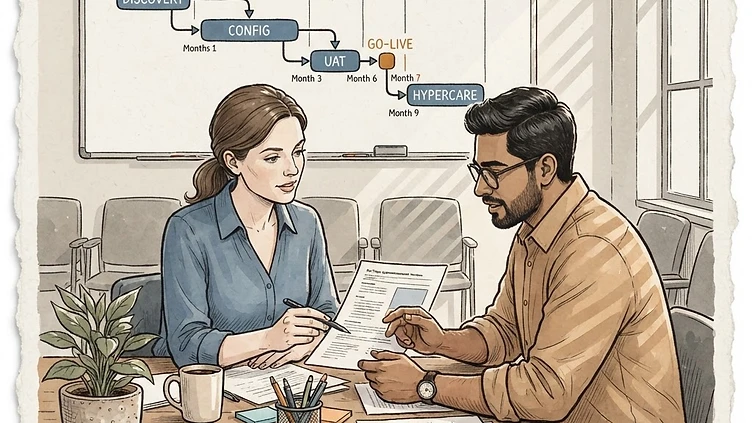
Mid-market companies evaluating Dayforce consistently ask the same question after the demo: "How long will this actually take?" The honest answer is 5–9 months for most organizations between 500 and 5,000 employees — with real variation based on integration complexity, data migration scope, and whether you have an experienced implementation partner. Here's the phase-by-phase breakdown.
The short answer first
Most mid-market Dayforce implementations run 5–9 months from contract signature to go-live. The variance isn't about Dayforce — it's about your integration complexity, data quality, and internal decision-making speed.
- Simple: Core HR + payroll only, no integrations, clean data → 5–6 months
- Typical: HR + payroll + time + one payroll integration → 6–8 months
- Complex: Multiple integrations, legacy data migration, complex org structures → 7–9 months
Phase 1: Discovery and scoping (weeks 1–4)
The first month is structure-setting. Your implementation partner maps your current HR, payroll, time, and benefits environment against Dayforce's capabilities and identifies the integration points that will drive your project timeline.
What happens in discovery:
- Current-state HRIS and payroll inventory: what systems are in production, who owns them, what's the data quality
- Integration mapping: which downstream systems consume data from your HCM (GL/accounting, benefits carriers, scheduling tools, SSO)
- Organizational structure review: legal entities, locations, cost centers, reporting hierarchies that need to exist in Dayforce
- Configuration scope definition: which Dayforce modules you're deploying in phase one
- Project team formation: who from your side will be the core implementation team
The output is a Statement of Work with a realistic timeline, an integration dependency map, and a configuration scope document.
Where companies delay: Discovery takes longer when the incumbent system is owned by someone who's not in the room — a legacy payroll system maintained by one person who's 60% allocated to other work. Getting full access to current systems and the right people in discovery is the first decision that sets the whole project timeline.
Discovery delay is the most preventable project risk. If your implementation partner can't get access to your incumbent system's data model within the first two weeks, the timeline will slip. Make sure your IT team has provisioned read access to your current payroll system, HRIS export files, and integration logs before your project kickoff. This is a week-one deliverable, not a week-three nice-to-have.
Phase 2: Configuration and data preparation (weeks 5–16)
Configuration is the longest phase and the one with the most schedule risk. This is where your implementation partner builds your Dayforce environment — organizational structure, payroll configuration, time and attendance rules, benefits enrollment setup, role-based access controls.
Configuration has two parallel workstreams:
System configuration — Your partner configures Dayforce based on your requirements. Key configuration areas: Legal entity and organizational structure setup, pay groups, pay components, earning codes, deduction codes, tax method configuration, work rules and attendance policies, benefits plan configuration and carrier connections, custom workflows and approval chains, role-based security and permission structures.
Data migration — Your existing employee data is extracted, cleansed, and mapped to Dayforce's data model. This is where most data migration projects get underestimated. Current employee data extraction, historical payroll data (YTD earnings, deduction balances, garnishments, benefit deductions), organizational hierarchy mapping, data cleansing, and data mapping documentation.
Where companies delay: Data quality is the most common cause of configuration-phase overrun. Legacy systems frequently have duplicate employee records, inconsistent job titles, incomplete addresses, and payroll data that hasn't been reconciled. The estimate for data cleansing is almost always too low because the complexity isn't visible until you're actually in the data. Plan for two rounds of data validation, not one.
Phase 3: Integration build and testing (weeks 10–20)
Need hands-on help with Dayforce?
Talk to our team →Integration development typically overlaps with the tail end of configuration — starting once the base Dayforce data structure is stable and running in parallel through the rest of the project.
| Integration | Complexity | Typical Build Time | |---|---|---| | General Ledger (accounting) | Medium | 3–5 weeks | | Benefits carrier feeds (834 EDI) | Medium | 3–6 weeks | | Time clocks / scheduling systems | Medium–High | 4–8 weeks | | SSO (Azure AD, Okta, Google) | Low | 1–2 weeks | | Applicant tracking system | Low | 2–3 weeks | | ERP integration (SAP, Oracle, NetSuite) | High | 6–10 weeks |
Integration testing is the phase most likely to be compressed when timelines slip. "We'll test at the end" is a pattern we've seen in every delayed implementation. Integration testing needs dedicated time in the schedule — specifically, time where the business (not just IT) validates that data flows correctly between systems.
Where companies delay: Integration testing failures in production-like environments. If your integration involves a benefits carrier or an accounting system owned by a third party, testing often requires coordinating with external parties who have their own release schedules. Build in two-week buffer windows for third-party integration testing.
Phase 4: UAT (User Acceptance Testing) — weeks 16–22
UAT is where your HR team, payroll team, and managers actually use Dayforce in a testing environment to confirm the system does what it needs to do before go-live. This phase is often shortened by schedule pressure — which is where post-go-live problems originate.
A proper UAT cycle includes:
- End-to-end payroll testing: run a full payroll through Dayforce and validate against your current system's output
- Manager self-service testing: approval workflows, direct report visibility, scheduling tools
- Employee self-service testing: profile updates, time entry, benefits enrollment, mobile access
- Integration validation: confirm data flowing to GL, benefits carriers, and downstream systems matches what was expected
- Exception handling: test your actual exception scenarios (garnishments, multi-state tax, FLSA overtime rules, leave accrual edge cases)
The UAT shortcut that causes post-go-live fires. Skipping payroll parallel-run testing to hit a go-live date is the single most common cause of day-one payroll errors we see in Dayforce implementations. Running one complete payroll parallel between Dayforce and your incumbent system is non-negotiable — even if it takes two weeks and pushes the go-live date. The cost of a failed payroll run on Day 1 far exceeds the cost of a two-week delay.
Phase 5: Go-live and stabilization — weeks 22–26
Go-live is the transition event, not the end of the project. The two weeks after go-live are stabilization — monitoring, troubleshooting, and making rapid configuration adjustments based on real production usage.
Go-live activities: Final data migration, Dayforce live environment validation, user access provisioning, parallel payroll run, and monitoring.
Post-go-live stabilization: Daily exception review for the first two weeks of production payroll, integration file monitoring and troubleshooting, user feedback collection and priority configuration adjustments, and benefits carrier recon.
Common implementation delays and how to prevent them
- Data quality issues discovered late. The discovery phase should include a full data audit — not just field counts, but record-level validation against source systems.
- Integration scope underestimated. Every system that sends or receives data from your HCM is an integration. Inventory them all before the SOW is finalized.
- UAT compressed to hit a go-live date. The go-live date should be contingent on UAT exit criteria, not the other way around.
- Change management underinvestment. Training and user adoption should be concurrent with the technical build, not a post-go-live activity.
- Partner staffing discontinuity. Key resources leaving mid-project causes knowledge gaps that delay configuration decisions.
What mid-market companies should take from this
A realistic Dayforce implementation timeline for mid-market is 5–9 months. The variance is driven by your specific factors — integration complexity, data quality, and internal decision-making speed. The highest-leverage actions you can take to keep the timeline on track: invest in discovery, plan for two rounds of data validation, build buffer into integration testing, don't compress UAT to hit a date, and treat change management as a concurrent workstream with the technical build.
Struggling with Dayforce Consulting?
Harmon & Co specializes in Dayforce consulting for mid-market companies. We fix it the first time — no endless ticket queue, no generic advice.