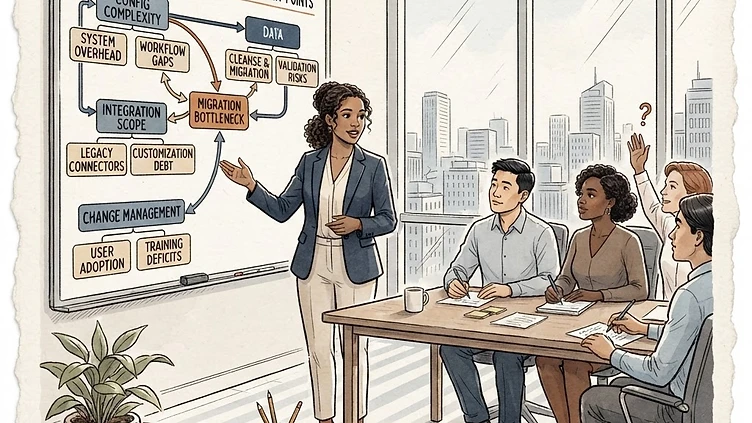
Mid-market Dayforce implementations fail in predictable patterns. Not because Ceridian builds a bad product — and not because mid-market companies are bad at projects. The failure modes cluster around a specific set of decisions companies make in the first 90 days of an implementation, and those decisions compound through go-live and into the first year of production. If you are planning a Dayforce migration or are in the middle of one, knowing where most implementations go wrong is the single most useful thing you can have before your project kickoff.
The underestimated complexity of Dayforce configuration
Dayforce is deeper than most mid-market companies expect. The organizational structure, earning codes, pay groups, work rules, and benefits configuration interact in ways that require hands-on Dayforce expertise to navigate correctly. We see companies come into a Dayforce implementation with a reasonable mental model of what they need — and discover, partway through configuration, that the setup they thought would take a week requires three.
The most common configuration failure is organizational structure setup. Companies map their current org chart into Dayforce and discover mid-implementation that the entity hierarchy they built does not support their payroll topology — especially for companies with multiple legal entities, shared services arrangements, or inter-company payroll transfers. The fix requires reworking the entity structure from scratch, which cascades into every downstream configuration: pay groups, tax authorities, benefits carriers, and reporting.
The second configuration trap is earning code and pay group architecture. Dayforce's earning code structure is more granular than most legacy systems — and more precise. When earning codes are not set up correctly against pay groups and tax methods, payroll calculates wrong silently. No error fires. The payroll run completes. The first signal is a W-2 that does not match what employees expected, or a quarterly filing that does not reconcile.
Work rules are the third configuration complexity that surprises mid-market companies. Dayforce manages time and attendance rules differently from most legacy systems — accrual policies, overtime rules, and attendance corrective actions all need to be configured to match your actual policies, not the Dayforce defaults. Companies that accept default work rules find themselves managing exceptions through manual workarounds after go-live, which defeats the purpose of the system.
Data migration failures: where the risk concentrates
Data migration is where most Dayforce implementations encounter their first serious problem. The migration involves extracting employee data from the legacy system, cleansing and transforming it, and loading it into Dayforce's data model — and every step in that chain has failure points.
Extraction failures: data that was never archived or was archived inconsistently, leaving gaps in employment history. Employees who were onboarded before a prior system migration may have records that exist in summary form but not in detail — compensation history, benefits elections, tax withholding elections that were not carried forward. When those records land in Dayforce, they arrive incomplete.
Transformation failures: the field mapping process — where each field in the source system is assigned to a Dayforce field — is where data quality problems surface. Most legacy systems have fields that do not map cleanly to Dayforce equivalents. The decisions made in the mapping process — which ones to leave blank, which to derive, which to accept as approximate — become permanent data quality problems in Dayforce.
Load failures: the actual transfer of data into Dayforce's staging environment, where validation rules can reject records. Records that fail validation and are not corrected before go-live become gaps in your employee database — and fixing them post-launch requires a manual remediation process that is expensive and time-consuming.
The mitigation for data migration failures is a structured migration validation process: running parallel payroll in the staging environment, comparing outputs against the legacy system, and resolving discrepancies before go-live. Companies that skip parallel payroll to save time are the ones who discover migration problems on their first production payroll run.
Integration scope gaps and the silent failures they produce
Dayforce does not run in isolation. For most mid-market companies, it sits at the center of an ecosystem: the general ledger, benefits carriers, time and attendance hardware, scheduling systems, and third-party payroll interfaces. Every integration point is a potential failure point — and companies consistently underestimate how many integrations they have until the implementation reveals them.
Need hands-on help with Dayforce?
Talk to our team →General ledger integration. Dayforce pushes journal entries to your GL, but the mapping of payroll costs to GL accounts is configured during implementation. If the GL account mapping is not set up correctly, your payroll entries land in the wrong accounts — and you do not discover it until your next financial close, when the reconciliation shows variances that are difficult to trace back to their source.
Benefits carrier feeds. Benefits enrollment data moves from Dayforce to carriers through EDI feeds. If the feed configuration is wrong — wrong plan IDs, wrong employee IDs, wrong coverage start dates — carrier systems reject the data silently. Employees show as enrolled in Dayforce but not in the carrier system. The problem surfaces when an employee seeks care and their coverage cannot be verified.
Time and attendance hardware integration. Time clocks and badge readers feed hours into Dayforce. When the integration configuration is wrong — wrong pay code mappings, incorrect overtime rules, missing Earned Time policy interactions — the hours that flow into Dayforce's payroll calculation are already incorrect. Fixing the downstream payroll is irrelevant if the upstream data is wrong.
Change management underinvestment: the implementation killer no one budgets for
The most common thread across failed mid-market Dayforce implementations is change management underinvestment. Companies treat Dayforce implementation as a technical project — get the system configured correctly, run parallel payroll, go live. They treat employee adoption as a secondary concern, or something that will resolve itself once the system is in production.
It does not resolve itself. Change management underinvestment produces a specific pattern of post-launch problems: managers who revert to offline processes because the system is too hard, HR staff who spend more time processing exceptions than doing strategic work, and employee confusion that generates a support ticket volume that overwhelms the payroll team in the first 30 days.
The companies that implement Dayforce successfully treat the technical deployment and the change management program as a single project with a single budget. They identify the managers and HR staff who will be most affected by the new system, involve them early in configuration decisions, and run parallel payroll with enough lead time that users can get comfortable before the system goes live for real.
Go-live risk: the two weeks that determine everything
Go-live weekend — the cutover from the legacy system to Dayforce — is the highest-risk period in any implementation. The data migration has been completed. The system configuration is locked. The integrations are tested in staging. Everything looks correct. Then the first production payroll runs, and problems that were not visible in staging surface immediately.
The parallel payroll window is the most important risk mitigation in a Dayforce implementation. Running both systems concurrently — the legacy system for actual payroll and Dayforce in a shadow mode — for two to three weeks before cutover gives the implementation team time to discover problems in real data before they affect actual pay. Most mid-market companies resist this step because it feels like doubling the payroll workload. The cost of skipping it is a production go-live with unverified data and unvalidated integrations.
What mid-market companies should take from this
Dayforce mid-market migration failure is preventable. The failure modes are predictable, the prevention steps are concrete, and the cost of prevention is a fraction of the cost of a failed implementation. If your implementation plan does not include a full data audit in discovery, employee-level reconciliation in parallel payroll, an integration inventory audit before the SOW is finalized, and a change management workstream that runs concurrent with the technical build, the highest-leverage action you can take is adding those steps before the migration begins — not after it fails.
Struggling with Dayforce Consulting?
Harmon & Co specializes in Dayforce consulting for mid-market companies. We fix it the first time — no endless ticket queue, no generic advice.