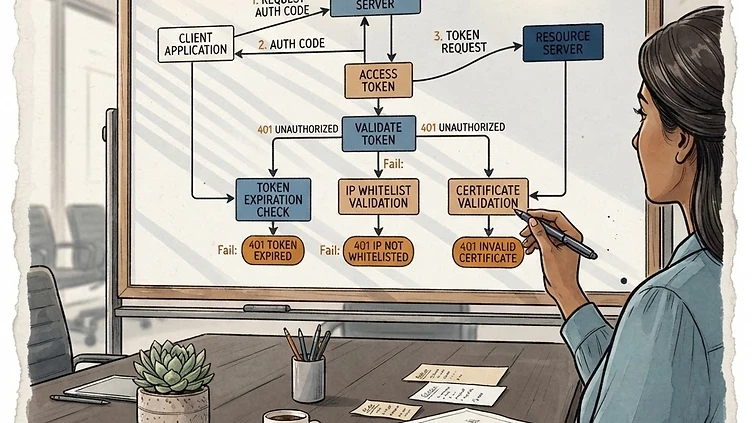
Your Dayforce integration is making API calls and getting hit with 401 Unauthorized responses. The credentials look right. The token looks fresh. But something in the authentication chain is failing, and the Dayforce error message isn't telling you what. Troubleshooting Dayforce API webhook 401 unauthorized errors requires working through a specific sequence of potential causes — because the symptom is always the same, but the root causes vary.
This post focuses specifically on Dayforce API authentication failures for webhook and REST API integrations. If you're troubleshooting webhook transmission errors (payload issues, URL mismatches, data transmission failures), see our guide on fixing Dayforce webhook Unauthorized and NotFound errors, which covers a different failure mode in the integration stack. If you're setting up SSO and hitting authentication issues there, our Dayforce single sign on guide covers that path separately.
The three primary causes of Dayforce API 401 errors
Dayforce API authentication failures fall into three buckets. Each has a different diagnostic approach and a different fix. Know which bucket you're in before you start changing configuration.
1. Token expiration or scope mismatch
The most common cause. Dayforce OAuth tokens have a defined lifetime — typically 1 hour, though this varies by tenant configuration and token type. When a token expires, the API returns a 401. If your integration isn't refreshing tokens proactively (before expiration, not after), you'll see failures that coincide with the token lifetime window.
Token scope mismatches are the second failure mode within this bucket. Dayforce APIs require specific scopes for different operations. If your OAuth client was granted a subset of the scopes needed for the webhook or API call you're making, you'll get a 401. The token is valid — it just doesn't have permission for the operation.
How to diagnose: Check the WWW-Authenticate header in the 401 response. Dayforce returns this header with a specific error code that indicates whether the failure is due to token expiry, scope insufficiency, or a different authentication problem. If the response doesn't include this header, log the raw HTTP request and response including all headers — the header information is what tells you which of these three sub-causes applies.
How to fix: Implement a token refresh pattern that exchanges for a new token before the current token expires. Most OAuth libraries handle this with an expires_in parameter — set your refresh trigger at 80% of the token lifetime (e.g., refresh 48 minutes before a 60-minute token expiry). For scope mismatches, review the OAuth client configuration in Dayforce HCM and ensure the client has been granted all scopes required for your integration's operations.
2. IP whitelisting mismatch
Dayforce enterprise tenants can configure IP allowlisting on API clients. If your integration server's outbound IP address isn't in the Dayforce tenant's allowlist, API calls will return 401 regardless of whether the token is valid and properly scoped. This is particularly common when:
-
Your integration runs on a cloud platform (AWS, Azure, GCP) where the outbound IP can change on instance restart or scale events
-
You're migrating from an on-premises integration server to a cloud-hosted one and haven't updated the Dayforce IP allowlist
-
Your organization uses a proxy layer that changes the apparent origin IP of API calls
How to diagnose: Check whether your Dayforce tenant has IP allowlisting enabled. This is a tenant-level security setting in Dayforce HCM → System Administration → Security → API Security. If allowlisting is enabled and you don't know your integration server's current outbound IP, check it by visiting whatismyip.com from the integration server itself (or from the network where the integration runs). Compare that IP against the allowlist in Dayforce.
How to fix: Add your integration server's outbound IP address to the Dayforce IP allowlist. If your integration runs on a cloud platform with dynamic IPs, either use a static outbound IP configuration (most cloud platforms support this) or configure a range that's wide enough to cover your scaling pool. Document the IP(s) somewhere your team can reference — this will come up again every time you migrate or scale infrastructure.
3. Certificate and mutual TLS failures
Need hands-on help with Dayforce?
Talk to our team →Dayforce supports mutual TLS (mTLS) authentication for API clients at the enterprise tier. If your integration uses mTLS and the client certificate is expired, revoked, or doesn't match the certificate registered in the Dayforce tenant, the API call will fail at the TLS handshake layer — surfacing as a 401 or a generic connection error depending on where in the handshake the failure occurs.
Certificate issues are also relevant for non-mTLS integrations when your integration server or proxy layer performs TLS validation on outbound calls. If Dayforce's server certificate chain has changed (e.g., after a certificate renewal or infrastructure update) and your integration's TLS trust store hasn't been updated, the validation fails and the call is rejected.
How to diagnose: Use openssl s_client to test the TLS handshake directly from your integration server:
openssl s_client -connect api.dayforce.com:443 -servername api.dayforce.com
Check the certificate chain returned and verify expiration dates. For mTLS configurations, confirm that the client certificate you're presenting matches what's registered in the Dayforce tenant.
How to fix: For expired client certificates, renew through your certificate authority and update the certificate in the Dayforce tenant's mTLS configuration. For TLS trust store mismatches, update the CA certificates bundle on your integration server to include Dayforce's current certificate chain. Most Linux distributions update this via a package manager (sudo apt-get update && sudo apt-get install ca-certificates on Debian/Ubuntu). After updating, restart your integration service to ensure it picks up the new certificates.
A diagnostic checklist for Dayforce API 401 errors
Before changing anything, run through this sequence:
-
Log the full HTTP response — status code, all headers, response body. Don't just log the status. The WWW-Authenticate header contains the error code that tells you the failure reason.
-
Check token expiration — if you're using a token that was acquired more than 45 minutes ago, it may be expired. Check the token's expires_at or expires_in field.
-
Check OAuth client scopes — confirm the client in Dayforce has been granted all scopes required for the specific API operation you're calling.
-
Check IP allowlist — confirm your integration server's current outbound IP is in the Dayforce tenant's allowlist.
-
Test TLS directly — use openssl s_client or a similar tool to confirm the TLS handshake works end-to-end.
-
Test with curl — reproduce the exact call with curl (including the Authorization header and any custom headers) to confirm the issue is reproducible outside your integration code.
Preventive practices that reduce 401 errors over time
Struggling with Dayforce Consulting?
Harmon & Co specializes in Dayforce consulting for mid-market companies. We fix it the first time — no endless ticket queue, no generic advice.