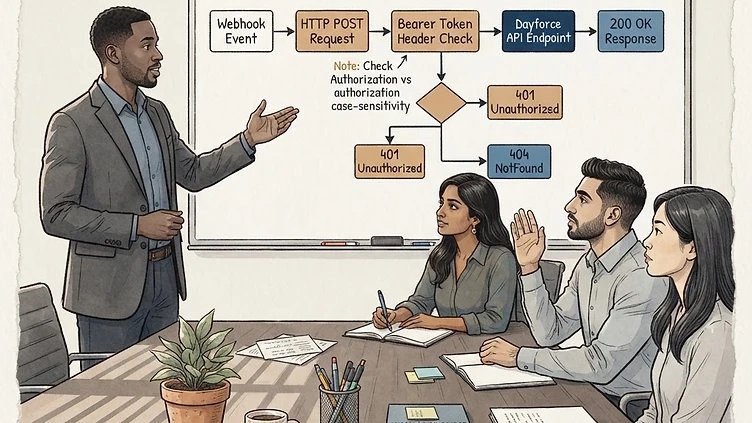
You've configured the webhook. The payload is correct. The OAuth client credentials are valid. But every time Dayforce tries to transmit data, you get back a 401 Unauthorized — or worse, a 404 NotFound that makes no sense because the endpoint clearly exists. You've checked the URL three times. You've regenerated the client secret. Nothing works.

This is one of the most frustrating integration issues in the Dayforce ecosystem, and it has a deceptively simple root cause that almost never appears in official documentation. Here's what's actually happening and how to fix it.

The "Unauthorized" error: it's the bearer token casing

Dayforce's webhook authentication layer requires strict case-sensitive bearer headers in OAuth server-to-server authentication. Specifically, the Authorization header value must begin with uppercase-B Bearer — not lowercase bearer.

Here's the problem: many OAuth servers and token libraries default to returning lowercase headers. When your OAuth server issues a token response and your integration layer constructs the authorization header as bearer eyJhbG... instead of Bearer eyJhbG..., Dayforce rejects the request outright with a 401 Unauthorized. No descriptive error message. No hint that casing is the issue. Just a flat rejection.

This is technically compliant with how some implementations read the RFC 6750 spec — the Bearer scheme identifier is defined with a capital B. But most modern API platforms treat this case-insensitively, so developers never encounter the distinction until they hit a system like Dayforce that enforces it strictly.

The result: your webhook payload is valid, your credentials are correct, your token is fresh — and the request fails because of one uppercase letter.

The "NotFound" error: wrong endpoint, wrong version, or missing path

If you're getting a 404 NotFound instead of (or alongside) the Unauthorized error, the issue is almost always in the webhook endpoint URL itself. Dayforce API endpoints are version-specific and path-sensitive, and small deviations cause silent failures.

The most common causes of Dayforce webhook NotFound errors:

  • Wrong API version in the URL. Dayforce periodically updates its API versioning. An endpoint that worked on /api/v1/ may now require /api/v2/ — or the version prefix may have been removed entirely in favor of header-based versioning. Check the current API documentation for your Dayforce release.
  • Missing or incorrect resource path segments. Dayforce endpoints often include tenant-specific or environment-specific path segments (e.g., /your-company-code/ between the base URL and the resource). If this segment is missing, misspelled, or uses the wrong environment identifier (staging vs. production), you'll get a 404.
  • Trailing slash mismatch. Some Dayforce endpoints require a trailing slash; others reject it. If your webhook URL ends with /webhooks/ but the expected path is /webhooks (no trailing slash), the request may resolve to a different route — or no route at all.
  • Base URL pointing to the wrong environment. Dayforce uses different base URLs for production, staging, and sandbox environments. A webhook configured in production that points to a sandbox endpoint URL — or vice versa — will return a 404 because the resource doesn't exist in that environment.

Step-by-step: diagnosing the failure

Before you change anything in your Dayforce configuration, isolate the problem. Here's the diagnostic workflow that catches 90% of webhook transmission failures.

1. Reproduce the request with curl or Postman

Take the exact webhook URL and credentials from your Dayforce configuration and test them manually. In curl:

curl -X POST https://your-dayforce-endpoint.com/api/v1/webhooks \
  -H "Authorization: Bearer YOUR_ACCESS_TOKEN" \
  -H "Content-Type: application/json" \
  -d '{"test": true}'

Pay attention to two things: the HTTP status code and any response body. A 401 with no body is the classic bearer casing issue. A 404 with no body means the URL is wrong.

2. Check the exact Authorization header your OAuth server returns

Log the raw HTTP headers that your integration layer sends. Not what you think it sends — what it actually sends. Many OAuth libraries and middleware normalize headers to lowercase automatically. Look for:

  • Authorization: Bearer ... (correct — capital B)
  • Authorization: bearer ... (incorrect — will cause a 401 in Dayforce)
  • authorization: Bearer ... (header name lowercase — may also cause issues depending on your proxy layer)

3. Verify the endpoint URL character by character

Copy the URL from your Dayforce webhook configuration and compare it against the API documentation. Check for:

  • Correct API version prefix
  • Tenant/company code in the correct position
  • No double slashes (//) in the path
  • Trailing slash presence or absence
  • Production vs. staging base URL

4. Check token expiration and scope

Even if the casing is correct, an expired token or a token with insufficient scope will return a 401. Verify that your OAuth client has the correct scopes assigned for webhook operations, and confirm your token refresh logic runs before the token expires — not after.

How to fix the bearer token casing

The fix depends on where in your integration stack the header is being constructed.

If you control the OAuth middleware: find where the Authorization header is built and hard-code the scheme as Bearer (capital B). Don't rely on the OAuth library's default — override it explicitly.

If you're using a third-party integration platform (Workato, MuleSoft, Boomi, etc.): check whether the platform has a setting for authorization header formatting. Many platforms allow you to set a custom header value. Set it to Bearer {token} explicitly rather than using the platform's built-in OAuth helper, which may default to lowercase.

If you're using a reverse proxy or API gateway (nginx, Kong, AWS API Gateway): check whether the proxy normalizes headers. Some proxies lowercase all headers by default. You may need to add a header transformation rule that ensures the Authorization value starts with Bearer.

Here's a quick Node.js example of the correct header construction:

// Correct — always use capital-B Bearer
const headers = {
  'Authorization': `Bearer ${accessToken}`,
  'Content-Type': 'application/json'
};

// Incorrect — will fail with Dayforce
// 'Authorization': `bearer ${accessToken}`

Common pitfalls when setting up Dayforce webhooks for the first time

Beyond the bearer casing issue, these are the most frequent mistakes we see in initial webhook configurations:

  • Not whitelisting Dayforce's outbound IP addresses. If your receiving endpoint is behind a firewall, Dayforce's webhook calls will be blocked before they ever reach your application. Check Dayforce's documentation for current outbound IP ranges and add them to your allowlist.
  • Using self-signed SSL certificates. Dayforce validates SSL certificates on webhook endpoints. Self-signed certs or expired certs will cause a connection failure that may surface as a generic error rather than a clear SSL warning.
  • Testing only in sandbox, then deploying to production without updating the base URL. Sandbox and production environments have different endpoint URLs, different client credentials, and potentially different API versions. A configuration that works in sandbox needs to be re-verified — not just copied — for production.
  • Not handling webhook retries. Dayforce may retry failed webhook deliveries. If your endpoint isn't idempotent — meaning it can safely receive the same payload twice without duplicating data — you'll end up with data integrity issues on the receiving end.

When to call in a consultant vs. DIY

If you've identified the bearer casing issue or the URL problem using the steps above, you can fix it yourself in minutes. It's a configuration change, not an architectural problem.

Bring in professional help when:

  • Your webhook failures are intermittent — sometimes they work, sometimes they don't — which suggests a token refresh timing issue or a load balancer routing problem
  • You're building a complex multi-system integration where Dayforce is one of several webhook consumers and the authentication layer needs to handle different casing requirements per system
  • You've fixed the immediate error but need a comprehensive audit of your Dayforce integration architecture — endpoint security, retry handling, payload validation, and monitoring
  • Your team doesn't have direct access to the OAuth server configuration and needs someone who can coordinate across IT, HR, and the integration vendor

The bearer casing issue is a five-minute fix once you know what to look for. The reason it takes teams days to diagnose is that nothing in the Dayforce error response tells you it's a casing problem. Now you know. If the rest of your webhook architecture needs a review, that's a conversation worth having.

Ready to optimize your Dayforce environment?

Book a free consultation with our team.

No pitch, no pressure. We'll review your situation and tell you honestly what it would take to fix it.

Book a Free Consultation